Pay Stub
$8.99 or from $4.99 in a bundle
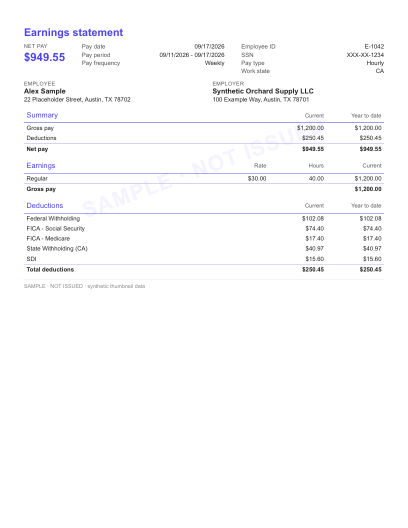
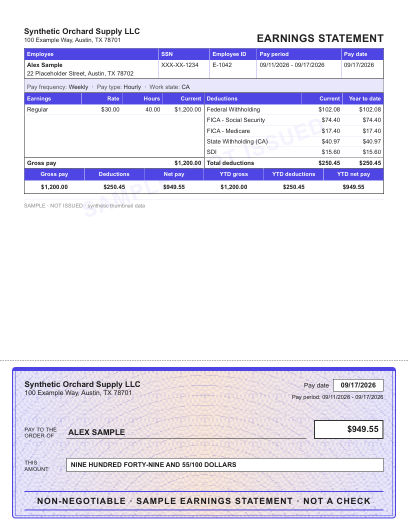
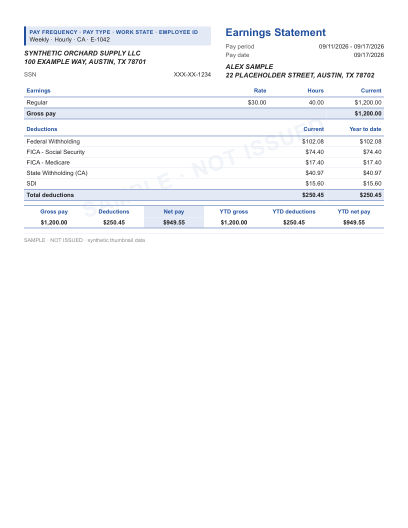
For each pay period: earnings, taxes and deductions, net pay and year-to-date totals.
Create a Pay StubPay stubs · W-2 · 1099 · Invoices
Create a pay stub, a W-2 or a 1099 in minutes: for your employees, your contractors or yourself. Choose a document to start.
$8.99 or from $4.99 in a bundle
For each pay period: earnings, taxes and deductions, net pay and year-to-date totals.
Create a Pay Stub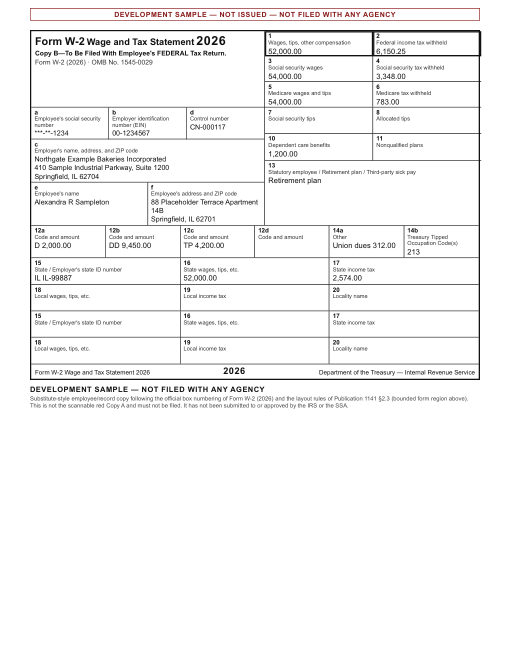
$14.99 or from $11.25 in a bundle
The year-end wage and tax statement an employer gives each employee.
Prepare a W-2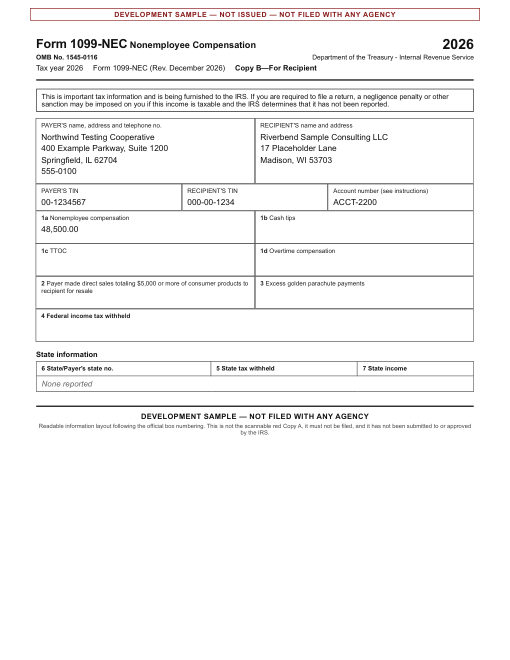
$14.99 or from $11.25 in a bundle
1099-NEC and 1099-MISC for the contractors and other payees you paid.
Prepare a 1099Preview before you pay · No subscription · Invoices are free
Three steps, a few minutes
Enter the pay details, check the preview against your records, and download the PDF. PayStubsKit calculates the taxes and deductions along the way.
Add your business, the person you paid, the pay period, and the hours or salary.
Check gross pay, each tax and deduction, net pay and year-to-date totals in the preview. Change anything that does not match your records.
Pay once, download the PDF, and keep a copy for your records and theirs.

The screens above are illustrations with sample figures.
Who it is for
Running a small business means wearing many hats. Create a pay stub for each employee every pay period, with taxes calculated for you, and spend your time on the business instead of on spreadsheets.
Make business pay stubs →Employing a nanny, caregiver or housekeeper? Give them a pay stub showing their wages and the taxes you withheld. Several states require household employers to provide one.
Create household pay stubs →Consultants, therapists, photographers and other solo businesses can record what the business paid its owner, period by period, with year-to-date totals that match the books.
Create self-employed pay stubs →From graphic designers to construction contractors: turn irregular invoices and deposits into a consistent earnings statement for each period, issued under your own business name.
Create contractor pay stubs →Driving or delivering for a platform makes you an independent business. Combine your actual payouts into one statement per period, in your own name rather than the platform’s.
Create gig income statements →Paying employees who work in another state? Enter the state where each employee works and the state withholding on their stub is calculated for that state.
Create multi-state pay stubs →Didn’t receive a pay stub, or lost the one you were given? Create a record of that pay period from the pay you actually received: your rate, your hours and the taxes that were withheld.
Create an employee pay stub →Prepare pay stubs for your clients’ employees from the payroll records you already hold, or recreate stubs for past pay periods that were never issued.
Create client pay stubs →Pay stubs are the record of what each employee was paid. They support transparency with employees and help with wage questions and audits under state law and the Fair Labor Standards Act.
Create pay stubs →PayStubsKit is for recording pay that was actually paid, whether you are the one who paid it or the one who received it.
Pricing
Why PayStubsKit

Create pay stubs, W-2 forms and 1099 forms in a few guided steps. PayStubsKit does the arithmetic, so there are no manual calculations or spreadsheets.
When your document is ready, download it as a PDF. Print it or email it to the person you paid, and keep a copy for your own records.
Federal income tax, Social Security, Medicare and state withholding are itemized line by line, with year-to-date totals, so you can see how every figure was reached.
Spend less time on paperwork. Enter the pay details once and let PayStubsKit carry the totals forward from one pay period to the next.
Pay stubs, W-2 forms and 1099 forms for the people you pay, prepared in minutes. Start using PayStubsKit today.
Create a Pay StubPlain and simple
Why not a spreadsheet?
PayStubsKit.com is a set of simple tools for the paperwork that comes with paying people. Whether you are an employer with a small team, a household employer, or a self-employed person recording what your own business paid you, you can prepare pay stubs, W-2 forms, 1099 forms and invoices without payroll software.
| What matters |  | Spreadsheet or word processor |
|---|---|---|
| Tax calculations | Worked out from federal and state tax tables | Looked up and calculated by hand |
| Year-to-date totals | Carried forward from stub to stub | Re-added every pay period |
| Layout | Ready-made templates with your logo | Built and formatted yourself |
| Checking your work | Live preview with every line itemized | Formulas you have to audit yourself |
| Year-end forms | W-2 and 1099 recipient copies | Separate forms to find and fill in |
| Cost | $8.99 per pay stub, less in a bundle; no subscription | Free, apart from your time |
Four documents, one account
Enter your company’s information, the employee’s details and the pay for the period, and the pay stub generator produces a clear, itemized pay stub.
Every stub shows how net pay was reached, line by line.
Calculations are estimates based on the information you enter and the tax tables for the year and state you select. They are not tax advice.
Create a pay stub →As an employer, you give each employee a Form W-2 after the end of the year. The W-2 generator prepares the employee copies from the annual wage and withholding totals in your payroll records.
PayStubsKit prepares the employee copies only. It does not file W-2s with the Social Security Administration; you file those yourself.
Prepare a W-2 →If you paid independent contractors or freelancers during the year, you report those payments on a Form 1099. The 1099 generator prepares the recipient copy for each person you paid.
PayStubsKit prepares the recipient copies only. It does not file 1099s with the IRS or any state; you file those yourself.
Prepare a 1099 →For freelancers, contractors and small business owners, the free invoice generator is a quick way to bill clients and keep track of what you are owed.
A clear invoice makes it easier for clients to pay you on time.
Create an invoice →Example scenario
Lisa keeps the books for a landscaping company with six employees. Every other Friday she used to build pay stubs in a spreadsheet, looking up withholding by hand and hoping the year-to-date totals still matched. Now she enters the hours, checks the preview against her payroll records, and downloads six PDFs before lunch.
If your payday looks like Lisa’s used to, try it on your next pay run.

Creating an account and previewing your document are free. You pay when you download: $8.99 for a pay stub and $14.99 for a W-2 or 1099, or less per document with a credit bundle. Invoices are free.
Yes. If your employer did not give you a pay stub, or you lost one, you can create a record of that pay period from the pay you actually received. Use your real employer, your real pay and the taxes that were actually withheld. A W-2 is different: it is issued by the employer, so ask them for it.
A pay stub generator is an online tool that turns the pay details you enter into a formatted pay stub. You supply the employer, the employee, the pay period and the pay; the tool calculates the taxes and deductions, keeps the year-to-date totals, and produces a PDF.
Enter your business details, the details of the person you paid, and the hours and rate or salary for the pay period. PayStubsKit calculates federal and state withholding, Social Security and Medicare, and shows the result in a preview. When the figures match your records, pay for the stub and download it as a PDF.
Your business name and address, the employee’s name and address, their filing status and other Form W-4 details, the pay period and pay date, their pay rate and hours or salary, and any deductions or benefits for the period. An employer identification number and the last four digits of the employee’s Social Security number are commonly shown as well.
Your business name and address, your own name and address as the person paid, the pay period and pay date, and the amount your business actually paid you for the period, taken from your invoices, deposits or books. If you pay yourself wages through a corporation, you also need your Form W-4 details so that withholding can be calculated.
Federal law does not require employers to hand out pay stubs, but the Fair Labor Standards Act does require them to keep records of hours worked and wages paid. Most states go further and require a pay statement each pay period, on paper or electronically, and they differ on what it must show. Check the rules of each state where you have employees.
Yes, when you are the one who made the payment, or you act for them, and the figures are true. Employers, household employers and self-employed people create pay stubs this way every day.
A stub you create here is a record of what your business paid. Whether a landlord, lender or agency accepts it is their decision, and many ask for bank statements or tax returns alongside it. We cannot promise acceptance by anyone.
Your own business as the payer, and the amounts your business actually paid you. If you are a sole proprietor you generally do not withhold tax from your own pay. If you pay yourself wages through a corporation, the stub should show the taxes your corporation withheld.
Yes, in your own name as an independent business, from your actual payouts. Do not list the platform as your employer; it is not, and the stub would be inaccurate.
Yes. Enter the same figures the original showed: your employer, the pay period, your pay and the taxes withheld. Your employer or their payroll provider can also give you a copy, and that is the best source if you are unsure of any figure.
No. PayStubsKit prepares PDF copies for you and the recipient. You file with the Social Security Administration or the IRS yourself.
They follow the published federal and state withholding tables for the year you select, using the details you enter. They are estimates; your actual tax liability depends on your full situation.
Contact our support team by email through the Support page.
Employee pay stubs contain various abbreviations that represent deductions, contributions, and other payroll details. Understanding these abbreviations is crucial for employees, freelancers, and employers to ensure accurate financial records and compliance with tax regulations.
Pay stub regulations can vary significantly from one state to another, with each state mandating different elements to be included on a pay stub. Understanding these requirements is crucial for employers to ensure compliance and for employees to understand their rights and the details of their compensation.
Accessing pay stubs is a crucial aspect of employment, as these documents provide important details about earnings, taxes, and deductions. Here are the general steps employees can follow to obtain their pay stubs, which may vary slightly depending on the employer's payroll system:
Electronic paystubs offer a modern, efficient, and environmentally friendly alternative to traditional paper paystubs. They bring a host of benefits to businesses of all sizes, enhancing operational efficiency, improving data security, and contributing to environmental sustainability.
Learn
Everything on this page and in our articles, in one list.
Pay stub basics
A pay stub (also called a paycheck stub, check stub, earnings statement or payslip) is a document that details an employee’s earnings and deductions for a specific pay period. It shows gross pay, the taxes withheld, other deductions and benefits, and net pay, which is the take-home amount. Most pay stubs also show year-to-date totals for each line.
Pay stubs are used to track earnings, taxes paid and overtime, and to check that each paycheck is right. They help at tax season, when the last stub of the year can be compared with the W-2, and they are the record employers rely on if a wage question or audit comes up. Lenders and landlords often ask employees for recent pay stubs, which is one more reason to issue a complete stub every pay period.
A pay stub shows exactly what was paid and what was withheld, so employer and employee are working from the same figures.
They help employees track their earnings, understand deductions, and manage their finances more effectively.
For employers, issuing pay stubs is often a legal requirement, ensuring transparency in wage distribution.
The name and address of the business that paid, and the name and address of the person who was paid.
The dates the pay covers and the date it was paid.
Earnings before anything is taken out: hours and rate or salary, plus overtime, bonuses or commissions.
Federal income tax, Social Security (6.2% of wages), Medicare (1.45%), and state or local income tax where they apply.
Health insurance, retirement contributions, wage garnishments and other amounts taken from pay.
The take-home amount for the period, and running totals for the year for every line.
Shows the hours worked and the hourly rate for the period, with overtime on its own line, followed by the taxes withheld and net pay.
Shows the salary for the pay period, which is the annual salary divided by the number of pay periods, followed by the taxes withheld and net pay.
Shows what the business paid for the period. Contractors generally have no taxes withheld, and the payer reports the year’s payments on a Form 1099-NEC.
An owner paid wages through a corporation gets a stub like any employee. A sole proprietor’s statement records what the business paid out, without withholding.
A pay period or pay date that does not match when the work was done and when it was actually paid.
Year-to-date figures that do not carry forward from the previous stub, or a net pay that does not equal gross minus deductions.
State withholding follows the state where the employee works, which is not always where the business is.
Employees have taxes withheld; independent contractors generally do not. Use the format that matches how the person is actually paid.
Leaving out a benefit, a retirement contribution or a garnishment that was really taken from the pay.
A misspelled name, a wrong address or a transposed figure. Check the preview against your records before you download.
PayStubsKit offers a user-friendly platform where you can quickly generate pay stubs online without needing any specialized knowledge or software.
Choose from a variety of templates and options, whether you are paying employees or recording what your own business paid you.
Have a question while creating a document? Our support team is available by email.
Taxes are calculated from published federal and state tax tables using the details you enter. The results are estimates; check them against your own records.
Download your pay stubs as soon as they are ready, as PDFs you can print or email.
Your information is sent over an encrypted connection.
Clear, consistent pay records make ordinary paperwork easier
Each card below is a situation where people are asked for pay records. PayStubsKit helps you keep those records properly, for the business that pays and for the person who is paid. What anyone decides on the strength of them is up to them.

Self-employed borrowers are usually asked for a history of earnings alongside bank statements and tax returns. Keeping a stub for every pay period means that history is already organized when you need it.
When you give someone a raise or a bonus, the next stub should show it clearly: the new rate, the bonus line, and the updated year-to-date total.
Landlords commonly ask self-employed applicants how they are paid. Period-by-period statements from your own business, which match your deposits, give a straightforward answer.
Employees applying for a mortgage will be asked for recent pay stubs. Issuing a complete stub every pay period means they are not chasing you for paperwork later.
If you withhold child support from an employee’s wages under an income withholding order, show it as its own deduction line every period, with a running total.
Turn irregular invoices and deposits into regular statements from your own business, so you can see what you actually earned each month.
A stub for every employee, every pay period, without subscribing to a payroll service.
Year-to-date totals on the last stub of the year make it easier to reconcile W-2s, 1099s and your own return.
Combine payouts from several platforms into one statement per period, issued in your own business name.
Taking on your first employee? Start with a proper pay stub from the first payday.
Sponsored employees are often asked to show pay records from their employer. Give them a complete stub each period as a matter of course.
Keep your stubs so you or your employees can compare them with the earnings the Social Security Administration has on file.
Federal law requires employers to keep records of hours and wages. Consistent stubs are the simplest way to show what was paid if a wage question or audit arises.
Net pay, period by period, is the starting point for any budget — yours or your business’s.
Stay on the right side of the law
A pay stub with false figures is a fraudulent document, even when it was made with a legitimate generator. The consequences fall on the person who uses it.
Using a false pay stub to obtain a loan, a lease or a benefit can be charged as fraud under federal and state law, with fines and possible prison time.
Lenders and landlords check income against employers, bank statements and tax records. A stub that does not match is a reason to turn an application down.
A loan or lease obtained with false documents may be called in or ended when the discrepancy comes to light.
A fraud conviction can follow a person into future job, credit and housing applications.
PayStubsKit is a record-keeping tool. It is for documenting pay that was actually paid.
The PayStubsKit Advantage
Withholding is worked out from the published federal and state tax tables for the year you choose.
Every figure appears in a preview first, so you can check earnings, deductions, net pay and year-to-date totals against your records before you pay.
Employer and employee details, pay period, gross pay, itemized taxes and deductions, net pay and year-to-date totals — the items most state pay-statement laws list.
Enter your information, choose a layout, and download the finished PDF. No payroll software to install or learn.
Your information is sent over an encrypted connection.
No subscription. Preview your document first and pay only when you download it.
About
PayStubsKit.com is an online document-preparation service for small employers, household employers and self-employed people. We build simple tools for the paperwork that comes with paying people: pay stubs, W-2 forms, 1099 forms and invoices. You pay per document, with no subscription.
PayStubsKit is not a payroll provider. It does not move money, pay employees or file forms with any agency.
You stay responsible for the accuracy of the information you enter and for your own payroll and tax filing obligations. PayStubsKit takes care of the arithmetic and the layout.
PayStubsKit Blog
Hey there! If you’re reading this, you’re probably wondering about the ins and outs of creating paystubs. Maybe you’re an employer looking to streamline your payroll process, or perhaps you’re self-employed…
Read article →Picture this: It’s payday, and you’re excited to see the fruits of your labor. You open your pay stub, and… wait, what are all these numbers? If you’ve ever felt like you need a decoder ring to understand your…
Read article →Picture this: It’s payday (cue the happy dance!), and you’ve just received your paycheck. But wait, what’s that paper attached to it? Or if you’re more of a digital person, what’s that PDF in your inbox? That,…
Read article →Choose a document. You can preview it before you pay.
FREE TO PREVIEW